What's New in the Web Version of SciFinder - April 2012
New SciFinder Enhancements Provide Convenient Access to Content (April 2012)
The latest update of SciFinder debuts features that boost search convenience. The new features include direct searching of substance properties, converting CAS Registry Numbers® to structures, and convenient preview of substance and reference answer sets with Quick View.
Property Search
SciFinder now enables users to search substances by individual experimental or predicted property. Researchers can target substances with a particular property value or range of values in the CAS REGISTRYSM, which contains more than 66 million substances characterized by 3.6 billion experimental and predicted properties.
Convert CAS Registry Number to Structure 
Structure searching has been made easier by the convenience of inputting a CAS Registry Number to the structure editor. As an alternative to drawing a structure, a CAS Registry Number is entered by using the Add to Editor function.
The editor displays the associated chemical structure, which can then be used or easily modified for a structure, reaction, or Markush search.
Preview Substance and Reference Answer Sets with Quick View 
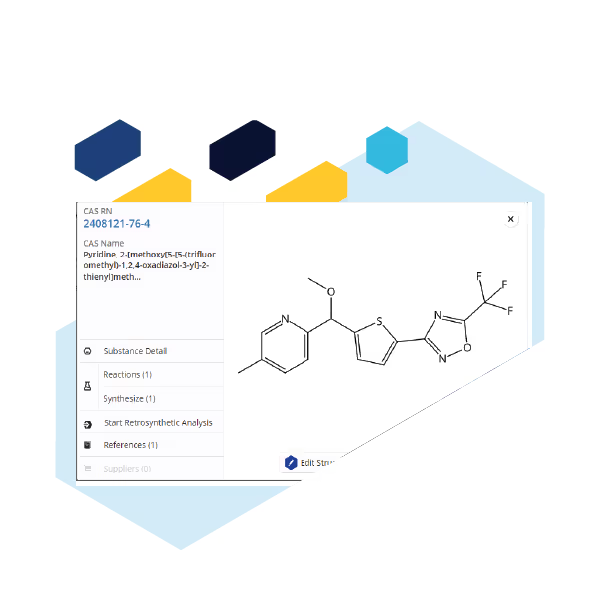
From multiple locations in SciFinder, users can preview additional details about a substance or reference through use of Quick View. Working with answer sets is more efficient and convenient since Quick View is presented as a pop-up screen, enabling the user to remain in their current view.
Substance Quick View
Hover over an individual compound in a substance answer set and click the magnifying glass icon to see a substance Quick View, which contains additional information such as synonyms, molecular formula, and source of registration.

Quick View is interactive. Click on the CAS Registry Number link to go directly to a Substance Detail page.
Reference Quick View
In a reference answer set, Quick View includes the full abstract, bibliiographic information, ACS journal Table of Contents graphics, abstract graphics, and structure images for up to the first 50 indexed substances.
Within a reference Quick View click the reference title to go directly to the Reference Detail page. Full text access is also just a click away.
Quick View is available in other locations such as the Citations and indexed Substances sections of Reference Detail.